Automated website security scanning with real pentest tooling
AuditWard runs an AI website security scan from one URL. Real pentest tools probe the live site while an agent drives a Chromium browser, then an Analyst returns triaged, confidence-scored findings tagged to PCI DSS, SOC 2, GDPR, OWASP Top 10, HIPAA, and ISO 27001, with screenshots and a PDF report.
One audit, browser and network together.
Most scanners look at the network surface or the front end, not both. AuditWard does both in a single run. It opens your site in a real Chromium browser the way a user would, and it points pentest-grade tools at the same target to check transport security, headers, exposed paths, and the technology stack behind the page.
Real browser context
The Explorer agent loads pages, follows links, fills forms, and watches what the app actually renders. That catches issues a header-only scanner never sees, like a leaked token in a client response or a broken auth flow.
Pentest-grade tooling
curl, testssl.sh, Nuclei, Nmap, Gobuster, nslookup, and WhatWeb run against the target. They check TLS configuration, open services, security headers, hidden directories, and known weaknesses in the detected stack.
Compliance context
Each finding is tagged to the frameworks it touches, so a missing header or weak cipher comes back labeled for SOC 2, PCI DSS, GDPR, OWASP, HIPAA, or ISO 27001 work, not as a raw line of tool output.
One thing to be clear about. AuditWard is an automated vulnerability scanning tool, not a certified penetration test and not a PCI Approved Scanning Vendor. It finds and evidences issues quickly, then maps them to your frameworks. It does not replace a manual penetration test, and it does not make you compliant on its own. What it does is the legwork, so a human review starts from real evidence.
Dig into the details.
This page is the hub. From here you can read how findings map to a specific framework, see exactly what the scanner does, compare AuditWard with point tools, or look up the terms behind the scan.
Compliance frameworks
Compliance overview
How AuditWard supports your framework work and where the line sits between evidence and certification.
SOC 2
Map findings to the controls that support a SOC 2 readiness effort.
PCI DSS
Evidence for a PCI DSS 4.0 program. AuditWard is not a PCI ASV.
GDPR
Surface web issues that touch GDPR security obligations.
OWASP Top 10
See which Top 10 risk categories a finding falls under.
HIPAA
Tag findings against HIPAA security expectations for a web app.
ISO 27001
Connect findings to ISO 27001 controls during certification work.
How the scan works and what it finds
Scanner transparency
How the scanner identifies itself, verifies domains, respects robots.txt, and rate limits. No denial-of-service tests.
Audit AI-generated apps
A walkthrough for checking sites built with Lovable, v0, Bolt, or a coding agent.
Scan from Claude Code
Kick off a security scan straight from your coding agent over MCP and read the findings in-thread.
AI QA testing
The companion pillar: the same audit checks whether your app actually works.
Compare and learn the terms
AuditWard vs Intruder
A fit-focused comparison with the network vulnerability scanner.
AuditWard vs Detectify
How the two approach web application scanning differently.
Vulnerability scanning
What automated vulnerability scanning is and where it fits.
DAST explained
Dynamic application security testing in plain terms.
Security headers
The HTTP headers a scan checks and why they matter.
From a URL to triaged findings.
You give AuditWard a URL and any instructions. Four stages take it from there. A Planner sets the plan, an Explorer runs the site in a real browser, security tools probe the network surface, and an Analyst turns all of that evidence into findings you can act on.
Build the checklist
An LLM Planner reads the URL and your instructions, then writes a test checklist for the audit. It decides what to exercise in the browser and which security checks fit the target.
Run it in real Chromium
The Explorer agent works through the checklist in a real Chromium browser. It navigates, interacts, and captures what the live application does, including pages behind a login once you answer the credential questions.
Probe the surface
In parallel, curl, testssl.sh, Nuclei, Nmap, Gobuster, nslookup, and WhatWeb probe the target for TLS issues, open ports, exposed directories, missing headers, and known weaknesses in the stack.
Triage the evidence
An Analyst turns raw evidence into findings, scores each one for severity and confidence, attaches the compliance tags, and assembles the PDF report with annotated screenshots.
What you get back.
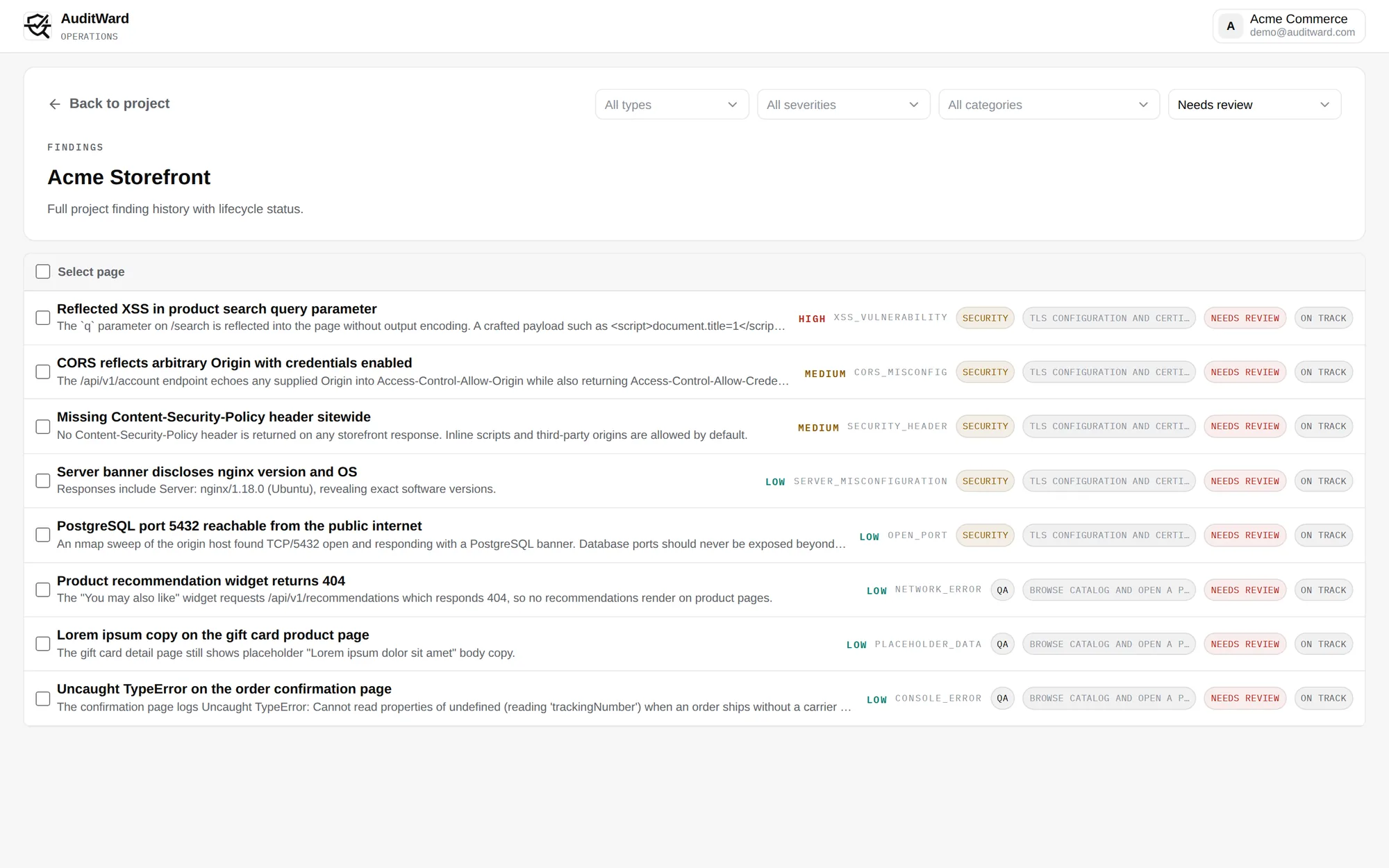
Every scan produces evidence you can hand to an engineer or an auditor. You get annotated screenshots from the browser session, a pentest-style PDF report, and findings that each carry their own framework tags. Nothing here is a single severity number with no context behind it.
Annotated screenshots
The Explorer captures the screen at the moment a finding shows up, so you see the affected page in context rather than a bare URL and a severity code.
Pentest-style PDF
The report reads like a tester wrote it: a summary, each finding with impact and remediation, severity, and the tooling that produced the evidence.
Per-finding tags
Tags are applied finding by finding, not as a blanket report-level claim. A weak header maps to the controls it touches, so you know which framework work it feeds into.
Built for teams shipping fast.
AuditWard fits anyone who needs security signal on a live site without standing up a tooling pipeline. It is a strong fit when code moves quickly and a web app needs a check before or after it goes out.
Builders using AI tools
Shipping an app from Lovable, v0, Bolt, or a coding agent? Run a security scanner for AI-built apps to catch the issues those tools skip. See the AI-generated app audit guide.
Teams chasing a framework
Working toward SOC 2 or preparing for a PCI review? A compliance vulnerability scan gives you evidence mapped to the controls so your audit prep starts from something real.
Founders and small teams
No security hire yet? Start a scan from the dashboard or your coding agent over MCP and get a report you can read and act on the same day.
The same audit also covers functional QA. If you care more about whether the app works than how it is exposed, read the companion pillar on AI QA testing.
Security scan questions.
Is AuditWard a penetration test or a PCI ASV scan?
No. AuditWard is an automated vulnerability scanning tool, not a certified penetration test and not a PCI Approved Scanning Vendor. It finds and evidences issues and maps them to frameworks, which complements a manual pentest rather than replacing it.
What security tools does the scan actually run?
Each audit can run curl, testssl.sh, Nuclei, Nmap, Gobuster, nslookup, and WhatWeb against the target. They check TLS configuration, open ports, security headers, exposed directories, and known weaknesses in the detected technology stack.
Can it scan a site behind a login?
Yes. When the scan reaches a login wall it pauses and asks structured questions. You answer in the dashboard or with qa_provide_context over MCP and the scan resumes. Your answers are encrypted before storage.
Does the scan make my site compliant?
No. AuditWard helps you find and evidence issues mapped to a framework, but it does not make you compliant and is not a certification. Treat the findings as inputs that support your SOC 2, PCI, GDPR, or ISO work.
How are findings prioritized?
The Analyst scores every finding for severity and confidence, attaches compliance tags, and writes impact and remediation notes. You see the highest-impact items first, each backed by screenshots and the tool output that produced it.
Will the scan harm my site?
No. The scanner respects robots.txt, rate limits its requests, and runs no denial-of-service tests. Domain takeover weaknesses are detected and reported only, never exploited. The scanner identifies itself as AuditWard/1.0.
Scan your site today.
The free Basic plan runs one combined QA and security scan a month and shows the first three findings per scan. Upgrade to Starter for MCP access and scans behind a login, or to Team for RBAC and compliance export.